Jan 2, 2018 · 10 min read
How You Can Publish A Book On Amazon And Sell Thousands Of Copies
I wrote a book, got it on Amazon and sold thousands of copies. More are selling right now as I am typing this intro.
I’m going to teach you how to publish a book on Amazon and sell thousands of copies.
How To Publish A Book On Amazon
Today, anyone can. Thanks to Amazon, the days of shopping manuscripts to countless editors and publishing companies are over. Now, authors can bypass the process and publish themselves. The popularity of self-publishing is only growing, so much so that Amazon now offers thirteen active publishing imprints, each dedicated to its own genre. In 2016, 7 out of the top 10 Kindle best-sellers were books published by their imprints. In fact, indie authors are estimated to compose up to 20% of the book market. That means that readers aren’t relying on traditional or big name publishers for their next read; instead, they’re turning to smaller sources for their fix. The popularity largely has to do with pricing. The average retail price for indie books is $2.99 to $3.99, while those published traditionally charge generally anywhere from $7.99 to $14.99. So sure, this is all great news for you. But before the publishing game begins, your first task is to actually write the book. Here are a few tips to get you started:- If you already have a blog or publish articles, look at what your most popular topics are to find the focus of your book
- Research and outline first, then start writing
- Break the writing process up. Dedicate a certain amount of time each day to writing (don’t overwhelm yourself by trying to do too much too soon!)
- Run your ideas by a trusted friend or someone with experience in the area, and ask them to read over the finished product
- Invest in a quality proofreader to make sure the final manuscript is free of typos or any grammatical errors (Amazon will remove books with reported typos, formatting issues, etc. until the mistakes are fixed)
First Step: How To Publish A Book On Amazon
Determine Which Amazon Platform is Best For Your Book
Amazon offers three programs for publishing, depending on the format:- Kindle Direct Publishing – to publish Kindle ebooks
- CreateSpace – publish to print
- Audio Creation Exchange (ACX) – publish an audiobook
- Your book will appear in stores 24-48 hours after publishing
- You control all rights
- Set any price
- Make changes at any time
- Earn up to 70% royalties
- Tools are free to upload and publish your book
- You maintain creative control and your own copyright
- Quick turnaround. After publishing, your books will be available in just a few days
- Books are distributed globally
- Set any price
- Earn royalties up to 80%
- Sell through top retailers Audible, iTunes and Amazon.com
- Easy access to narrators of your choosing
- Earn high royalties, either for exclusive or non-exclusive distribution
Second Step: How To Publish A Book On Amazon
Build Pre-Launch Buzz for Your Book
Sigh of relief time. You’ve written your book and are ready to publish. Hard part’s over, right? Not exactly. Because if you want people to take notice, you need to build a little buzz for your book. The buzz should begin well before your book hits the shelves (or online marketplace), and there’s plenty of ways to accomplish that. One of the most straightforward and effective is to offer pre-launch discounts through pre-orders. By allowing pre-orders, you’ll build anticipation and excitement by allowing your fans the chance to be among the first to get your book. In a survey conducted in 2015, Smashwords found that ebooks born as preorders sell significantly more on average than books that are simply uploaded the day of release. On top of that, offering a free download or discounted price to blog subscribers or social media followers will serve to further entice by creating exclusivity. Another way to build buzz is through email marketing. Email continues to be one of the most effective strategies for driving book sales, and should be used in all stages of promotion. Use it to build buzz by teasing special offers, book excerpts and links to your landing page. Other strategies to consider are:- Set up a dedicated landing page, direct people to the page through your social media accounts and encourage them to share
- Send out a pre-launch press release
- Research influential bloggers in your target market, and offer them a free book in exchange for a review
- Run ads on social media
- Guest blog on sites your target market visits
Third Step: How To Publish A Book On Amazon
Collect Reviews on Goodreads
Positive books reviews are invaluable when it comes to promotion, and Goodreads is a great place to start. Goodreads, aimed at book discover and designed to help readers find and share books they love, has exploded in popularity over recent years. And for writers, that’s a very good thing. The platform allows authors to interact and appeal to directly to readers. Patrick Brown, director of Author Marketing, recommends the following strategies to authors:- Set up an author page on Goodreads and create an interesting profile
- Use Goodreads giveaway programs to find readers and generate reviews. Brown says, “The giveaways raise exposure for the book, encourage users to add the book to their reading list, and help boost user ratings and review numbers. We recommend always including a personal note, and even signing the giveaway copy when possible, thanking the winner for their interest and asking them to post a review.”
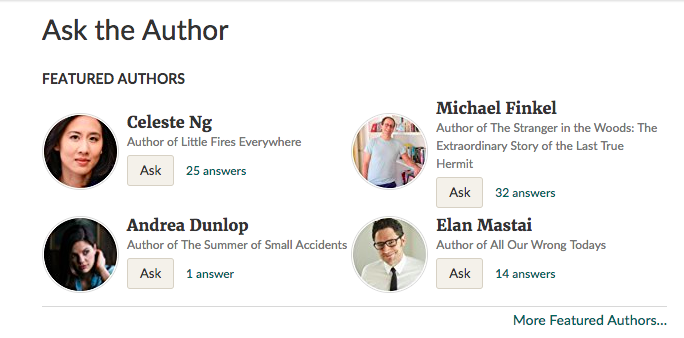
- Answer questions through Ask the Author
Forth Step: How To Publish A Book On Amazon
Ask Your Friends and Family to Buy and Review Your Book
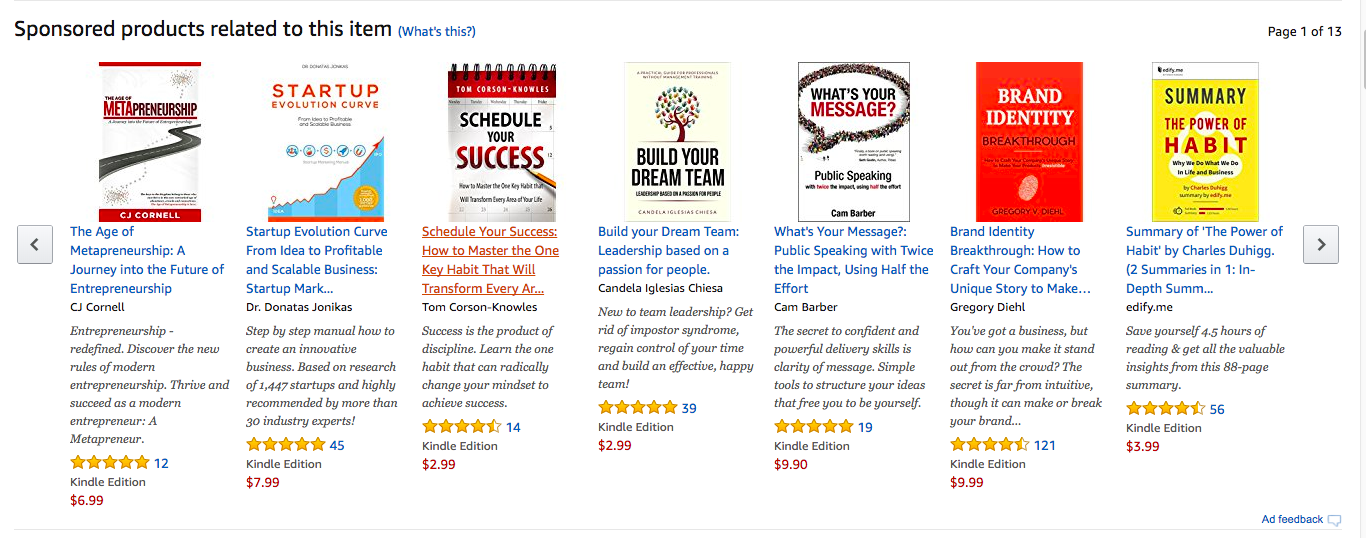
Of course, the best way to build a review base is to appeal to your built-in fans: your friends and family. There’s little strategy required here. Most will be happy to contribute and pay for your work and drop a positive review where it counts: on Goodreads and Amazon. Run Ads on Amazon Because most indie authors tend to price their books in the $3.99 or below range, pricing isn’t the most effective way to collect new readers. For that, it’s best to invest a little in advertising on Amazon. You can advertise your KDP ebooks easily through Amazon Marketing Services. Much like common PPC campaigns, you will set the budget for your ad and the maximum amount you’ll pay when someone clicks on your ad. You will only be charged when someone clicks the ad. To set up, you’ll first need to determine your campaign type. For ebooks, you have two options:- Sponsored Product Ads – target customers through keywords; clicks on the ad will direct customers to the product detail page
- Product Display Ad – target by related products or customer interests