Mar 7, 2018 · 11 min read
Detailed Iconosquare Review You Must Read (Beware It Is SO!)
Awesome!
Looking for a Iconosquare review?
It’s the top tool when it comes to Instagram management, and in this article, I’ll cover some of the highlights Iconosquare has to offer, and why it’s the Instagram tool of choice for most social media managers.

Iconosquare review – What Exactly is Iconosquare Anyway?
Iconosquare is a social media scheduling and monitoring that works specifically with Instagram – and as of recently, Facebook as well. In its own words, Iconosquare “works with your Instagram account to help you grow a social-rich media strategy, effectively interact with your community and measure your efforts with metrics.” As of now, Iconosquare is one of the top platforms’s in its space, with over 10 million users and a top rank as one of the top 800 websites in the world. So let’s see what all the fuss is about, shall we?Iconosquare Review: Analytics Overview
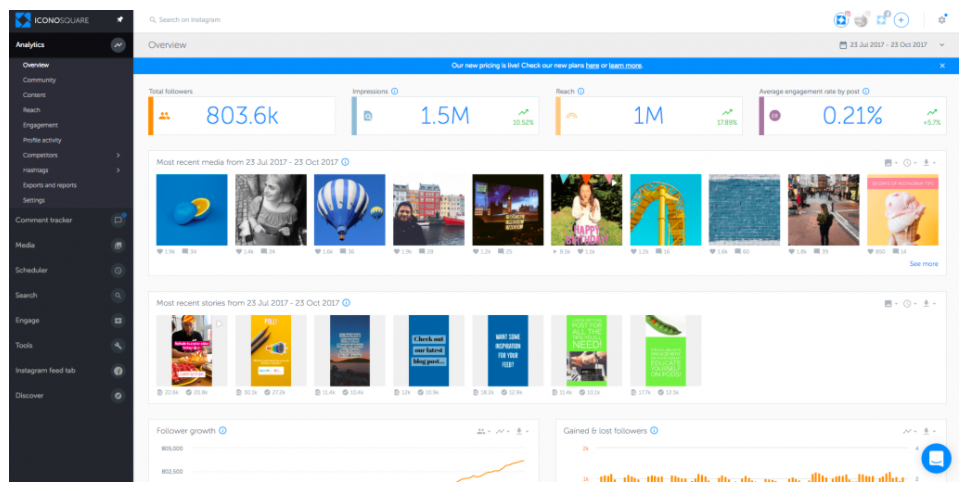
Comprehensive analytics is easily the most impressive aspect of Iconosquare. Using its advanced set of features, users can gain invaluable insight into their audience and performance. Once you’ve logged in, you’ll find all this information under the Analytics tab in the left side menu. The first screen you’re presented with is the general overview, which contains all the key stats you need to monitor on a daily basis, including:- Total followers
- Impressions
- Reach
- Average engagement rate by post
- Most recent media from [selected date range]
- Most recent stories from [selected date range]
- Gained & lost followers
Iconosquare Review: Best Times to Post
For starters, it delivers some impressive information regarding the best time to post. Under Analytics > Engagement > Best Times to Post, you’ll find a breakdown of the best times to post based on your engagement rate. Due to the recent algorithm updates on Instagram, your engagement rate is more important than ever. Posts are no longer shown in chronological order; instead, posts with the highest engagement rates will claim the highest positions. Needless to say, it pays off to pay attention. Iconosquare shows you the times your audience is most interactive with your content. It appears in graph form, with dark circles indicating when you typically post, and pink circles indicating the times when you should post. It tells you right at the top what the exact best day and time to post is for your audience, and you can hover over each square to see their exact engagement rates.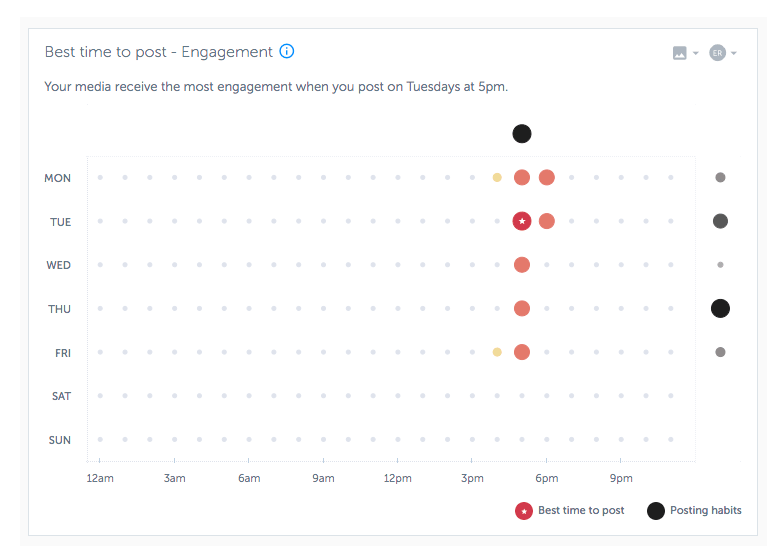
Most Engaging Posts
While we’re on the subject of engagement, I have to mention this section. It’s a staple in any social media tool, and for good reason. Remember: these days, it’s all about engagement. So keep a close eye on which posts are performing the best in the Top Posts section. It will show you your most liked, most commented, and most engaging over the last 30 days (the timeframe can be changed). This, of course, will help you see what kind of posts your followers like best so you can replicate them in the future.Iconosquare Review: Identify Post’s “Lifespan”
This is a cool one that tells you when an individual post received most of its engagement, and when that engagement began to drop off. You’ll likely notice that most of them receive the majority of their engagement pretty early on, with most dropping off after shortly after they’re published. What’s interesting is pay attention to any trends you find. Are there any patterns you can identify the posts that tend to have the longest lifespan?Community Stats
No social media tool is complete without a clear breakdown of your followers. Iconosquare offers all the usuals here – follower location details, demographics, etc. But some of its more advanced features will give you even better insight into who’s following you. Its “Rolling Month Analysis” tab, for example, will show you your top 10 most engaged followers for the month. It will also show you which percentage of your followers fall into the “influencer” category. Iconosquare defines an influencer as anyone with a 40+ followers/following ratio. Knowing who your influencers offer you an extreme advantage – these are people who are already aware of and following you, making it that much easier to open the door to influencer marketing and partnerships.Iconosquare Review: Gained and Lost Followers
First: a word of caution. On any given social channel, your follower base will fluctuate. You gain some, you lose some. That’s the name of the game, and it’s not worth obsessing over a few lost followers. Okay, on to the important stuff. What this section is most useful for is monitoring any spikes in loss or growth. Here’s what I bet you’ll notice: the more consistently you post, the more consistently your followers will grow. So if you’re ever suffering from posting-fatigue, head on over here for a little needed inspiration to keep your feed steady.Hashtag Tracking
Love ‘em or hate ‘em, it appears hashtags are here to stay, and using the right ones in the right post goes a long way in determining how many people will discover your post. Each post you produce should have multiple hashtags. These can be topics or keywords related or center around your particular business Naturally, you need a way to track them, which Iconosquare readily supplies. In the hashtag section, you’ll find a full breakdown of how well a particular hashtag is performing. Included is detailed information regarding the number of likes and comments it’s received and the number of posts that incorporate it throughout Instagram. Additionally, you can see the most influential posts using that hashtag, as well as the most influential people using it. All of this information will help you piece together a more effective hashtag strategy, identify related hashtags, and see what kinds of posts are generally associated with. Another awesome Iconosquare feature is that it allows you to for media with specific hashtags. So if I wanted to see all the media that contained #blog, I could do so right on the platform.Iconosquare Review: Competitors Benchmarks
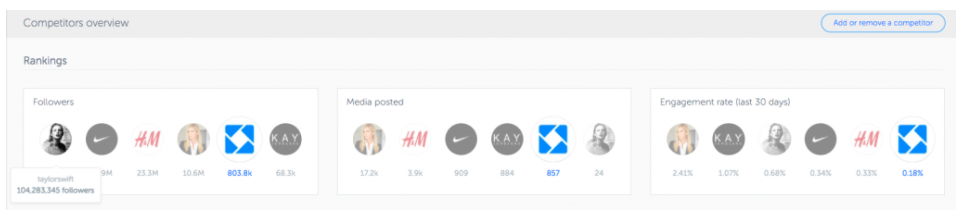
The best offense is a great defense, right? So stay ahead of the game by keeping a close eye on your competitors. Iconosquare makes it easy by allowing you to track other accounts of interest. Once you’ve selected your competitors, you can track their activity on Instagram and Facebook, and compare key metrics like engagement rate, followers, likes, comments, etc. Then, take it a step further by accessing even deeper analytics about them:- Their follower growth
- Their posting habits
- Which hashtags they’re using
- Their top performing media
- Etc.
Instagram Stories Analytics
One of Iconosquare’s recent additions is its analytics for Instagram Stories. With it, brands can monitor:- Stories insights: Analyze your stories performance to optimize your strategy with important KPIs like impressions and completions
- New post insights: Understand your reach, impressions, and video performance over time.
- Demographics: Identify the main segments of your audience by age/gender and language
- Followers online: Know when your followers are most often online and tailor your posting strategy accordingly.
Iconosquare Review: Manage Your Content
There’s a lot to keep track of when it comes to social media. Just look at all we’ve covered above: engagement, hashtags, competitors, timing…it could all easily make your head spin. That’s exactly why we have tools like Iconosquare, which lets you separate, customized feeds. For example, you can have a feed dedicated to hashtags, influencers, and competitors.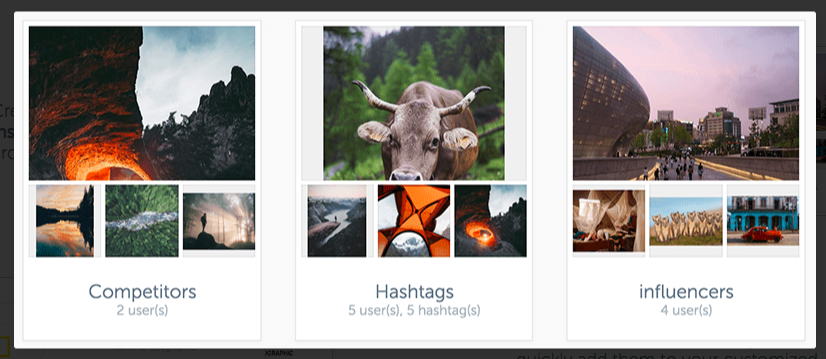
Iconosquare Review: Report and Export
As marketers and SEOs, the ability to offer clients real data in easy-to-read reports is crucial. With Iconosquare, you can export your data as you choose to a spreadsheet for easy reporting. Sign up for daily, weekly or monthly email reports, and Iconosquare will send you a personalized overview of your account’s performance, with insight into your community structure, follower growth and geolocation, your media, etc. Keep in mind, the starter plan only includes daily and weekly reports. To access monthly or yearly reports, you’ll need to upgrade to a higher plan.Iconosquare Pricing Overview
There was a time when most of Iconosquare’s features were free. But as they say, all good things must come to an end. There is a silver lining here: the platform does still offer a few handy features completely free, including:- Instagram audit – the free tool will analyze 20+ metrics on your latest 30 posts and provides tips on audience engagement, post optimization, etc.
- Brands Index – Identify brands with the best engagement ranking, and get a detailed analysis on their profile page
- Influencers Index – Identify influencers with the best engagement ranking and narrow them down by category