Jan 31, 2018 · 14 min read
Guide to Instagram Ads Types and Costs
Have you considered Instagram as an ad platform?
If so – great! Below I’ll cover everything you need to know regarding Instagram ad costs, as well as walk you through the different types, targeting methods and the general set-up process.
First of All, Why Instagram Ads?
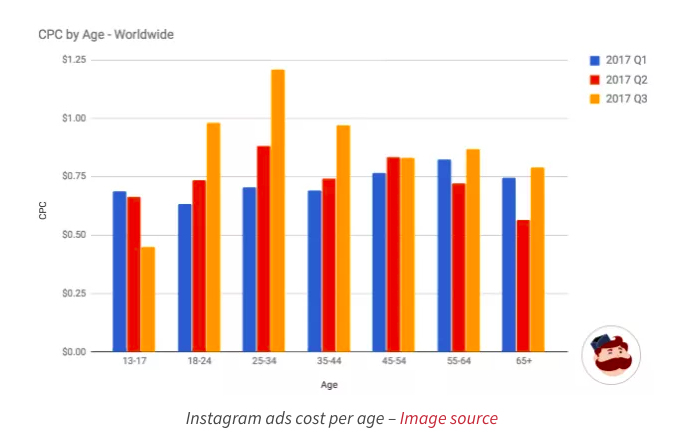
Because frankly, Instagram’s the place to be. As one of the fastest growing social media platforms (brand follower growth increases by 6% to 8% month over month!), it’s an ideal platform to focus on audience and follower growth. And because organic growth is harder to come by, brands will do themselves a favor by focusing on advertising. And perhaps most important, Instagram ads work. Instagram isn’t just for following friends anymore, and users are turning more and more to brands. In fact, Instagram itself found that 60% users say they learn about products and services through the platform, and 75% take action. That means they visit websites, search for a business, or tell their friends about it. Which is exactly the behavior you want in a potential buyer. And of course, there’s the fact that an Instagram study surveying 400 campaigns found that ad recall was 2.8 times higher than the norm. All of the above is enough to peak anyone’s interest in Instagram ads. But before diving in, let’s take a look at what everyone really wants to know: How much will an Instagram ad cost? Instagram Ad Costs Overview There’s really no way to know for sure how much an Instagram ad will cost you. We do, however, know that statistically, some demographics tend to cost more. AdEspresso analyzed several Instagram campaigns over the past year and found that on average, Instagram CPC falls between $.70-$1.00. That number depends on a variety of factors, and their study also revealed that:- Overall, cost per click (CPC) was highest on the weekend
- Tuesdays had the lowest CPC
- Sunday is the most expensive day to advertise
- CPC tended to get more expensive throughout the year
- 24-34 year olds had the highest CPC, followed closely by 18-24 year olds and 35-44 year olds
- Apple devices had the highest CPC
- CPC for women was significantly higher than men
- Females in the 18-34 age range had the highest overall CPC
-
How Your Bid Affects Instagram Ad Costs
- Your campaign bid – the more you pay, the more your ad will show
- Relevance score – relevance score is calculated based on negative and positive feedback received from its target audience. More positive reactions = higher relevance score. High relevance scores can:
- Lower the cost of reaching people – the higher your relevance score, the less it will cost
- Help advertisers test ad creatives – you can test different combinations of images, text, etc. to see which ultimately offer the highest relevance score
- Help optimize in-progress campaigns – you can monitor your relevance score as your ad runs, and tweak it if you notice any drops
- Estimated action rates – These are determined by Facebook, and represents how likely they think a person is to take a given action
- You could be charged less than your highest bid
- There’s no advantage to setting overly restrictive bid caps
3. How Targeting Affects Instagram Ad Costs
Instagram uses Facebook’s advertising, which means it uses the same targeting methods. Seeing as Facebook is pretty much the best in the biz when it comes to targeting, that’s a major advantage for your Instagram ads. Ads are targeted based on factors including:- Location – target based on specific locations; especially useful for smaller, brick-and-mortar businesses trying to attract a local clientele
- Demographics – target (or exclude) based on employment, education, age, gender, etc.
- Interests – target based on people’s interests, Pages the like, and their activity on Facebook
- Behaviours – target based on purchasing behaviour, activities, device, etc.
- Custom Audience – an existing set of contacts you can upload
- Custom Website Audience – a list of people who have visited your website in the past (extremely effective way to use remarketing, but requires the installation of the Facebook Pixel on your site)
- Lookalike Audience – an audience that looks like one you’ve already created (can be created based on a custom audience, website visitors, or from fan pages)
-
Time of Year and Instagram Ad Costs
Setting Up Your Instagram Ad
Now that you have an idea of what affects the cost of your ad, let’s take a look at the actual set up process. Though there are many ways to set up your ad, one of the most powerful and popular is through Facebook’s Ad Manager. The process is extremely similar to creating Facebook ads. To begin, you’ll first need to choose your ad objective.Choosing Your Instagram Ad Objective
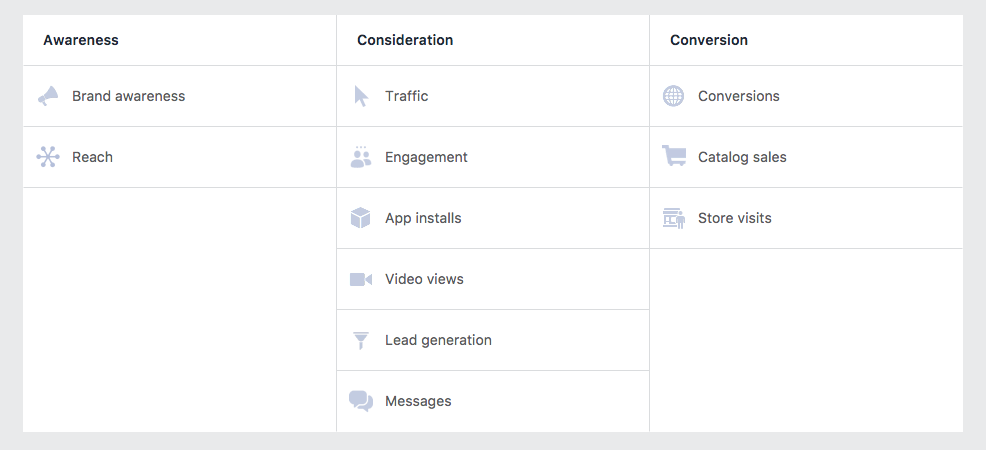
With Instagram ads, you have 8 options to choose from when it comes to outlining your objective. They are:- Brand Awareness – this one is pretty straightforward: it will be shown to those most likely to be receptive to it to help increase awareness of your brand.
- Reach – this maximizes how many people see your ad.
- Traffic – this objective helps send people to your website. If you choose this one, you’ll need to specify where you want to send the traffic
- Engagement – this promotes engagement. You can also specify what kind of engagement you’d like: post engagement, page likes, offer claims, etc.
- App Installs – this sends traffic to the app store so they can download your app (you will need to specify which app and which app store to send them to)
- Video Views – this promotes a selected video
- Lead Generation – this is meant to collect information from potential leads (this will require you to use a lead form)
- Conversions – this helps prompt people to take action on your site (you will need to specify the website and install the Facebook pixel to track conversions)
Select Your Instagram Ad Placement
Next up is placement. This determines where and how your ad will appear. Note that if you only want your ad to appear on Instagram (not Facebook) you will need to select Edit Placements and unclick any boxes in the Facebook category. Under the Instagram category, you can then choose if you want your ad to appear in user’s Instagram feed or as a Story.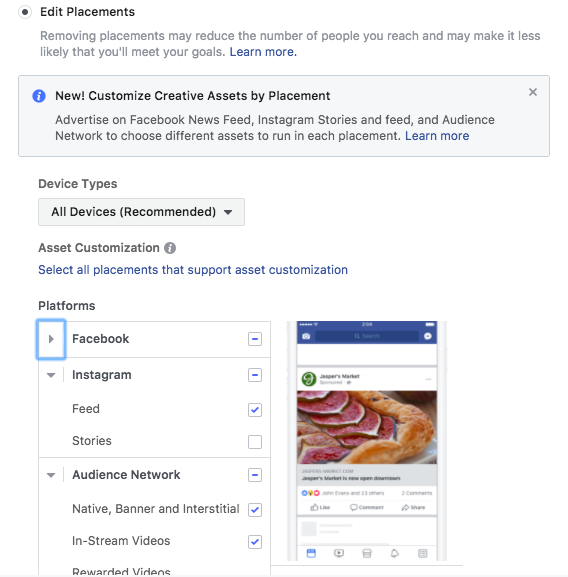
How to Set Up Your Instagram Ad Costs and Budget
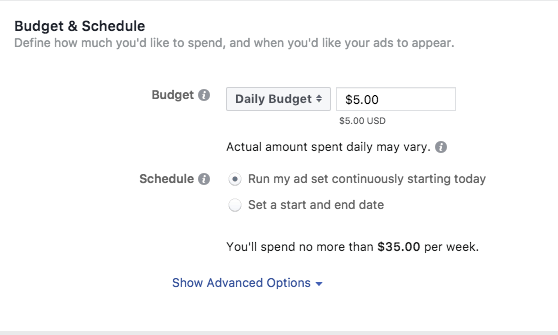
And then comes budget. This is listed directly below your Placement options in the Budget and Schedule section. There, you choose between two types of budgets:- Daily budget: This is an average amount you’re willing to spend every day during the campaign’s duration
- Lifetime budget: This is the entire amount you’re willing to spend during your campaign’s duration
- Cost per click (CPC) – You pay each time a user clicks on your ad
- Cost per Impressions (CPM) – You pay for every thousand impressions your ad receives
Optimization Options for Instagram Ad Costs
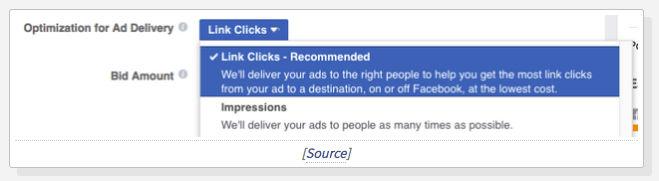
In the set-up process, you’ll be prompted to choose a delivery optimization option when you input your budget. According to Facebook, the method you choose: “to get you as many/much of that result as efficiently as possible…For example, if you optimize for link clicks, your ads are targeted to people in your audience who are most likely to click the ads’ links.” The option you choose will be directly tied to whether you end up paying by CPC or CPM. Your options are:- Conversions – your ad will be shown to those most likely to convert. With conversions, you’ll pay by CPM.
- Post Engagement – your ad will be shown to those most likely to like, comment, or share your ad. It’s paid by CPM.
- Impressions – Your ad will be shown to as many as people as possible within your budget. It’s paid by CPM.
- Link Clicks – Your ad will be shown to the people most likely to click on it. This is paid by CPC.
- Daily Unique Reach – Your ad is shown to users once per day. This is paid by CPM.
Types of Instagram Ads and Ad Costs
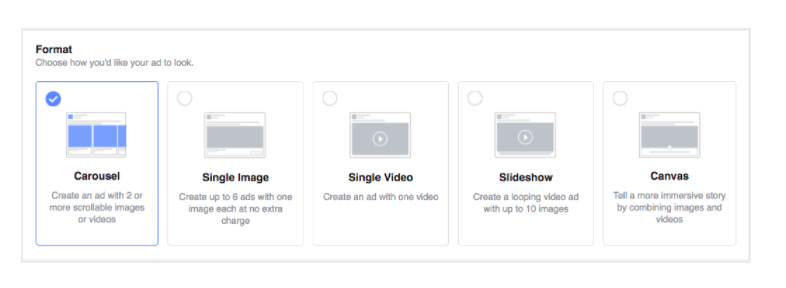
Last but certainly not least, it’s time to choose your ad format and create your ad. Instagram ads come in four styles:- Carousel Ads
- Single Image
- Single Video
- Slideshow
- Single Image
- Single Video
- Carousel Ads
- Single Image Ads
- Single Video Ads
- Slideshow Ads
- Instagram Stories Single Image
- Instagram Stories Single Video
- Show off your product – 65% of top-performing Instagram posts feature products.
- Instagram photos with faces are 38% more likely to receive likes and 32% more likely to receive comments.
- Keep an eye on your ROI – and make sure your campaign has a positive one
- Always test your objectives and creatives, and tweak when necessary
- Check your relevance score often