Nov 5, 2018 · 11 min read
iSpionage Review, The Pros and Cons Of This Tool
If you’d like to spy on your competitors so that you can learn more about their SEO secrets and conversion strategies, then you should take a look at iSpionage.
In this article, I’ll go over the features of iSpionage. I’ll also list its pros and cons so you can make an informed decision about whether it’s right for your business.
 In a nutshell, iSpionage enables you to:
- Maximize your online visibility with keywords that will bring targeted traffic to your site
- Generate more leads from the search engine results pages (SERPs)
- Increase conversion rates once people arrive at your site
iSpionage Review: A Breeze to Use
The first thing you’ll notice about iSpionage is that it’s incredibly easy to use. Just go to the home page, enter the name of a competing domain, and the tool will show you a report that’s packed with valuable info. It’s a familiar user interface if you used a similar tool in the past. The main sections are in tabs at the top. Just click one of those tabs to view the section you want to see. The data is presented in graphs where practical. Elsewhere, it’s mostly in tables. That makes it easy to get the info you’re looking for. I should also point out here that iSpionage runs in the cloud. That means you won’t have to worry about installing any software on your PC. Just visit the website, login, and start using the tool.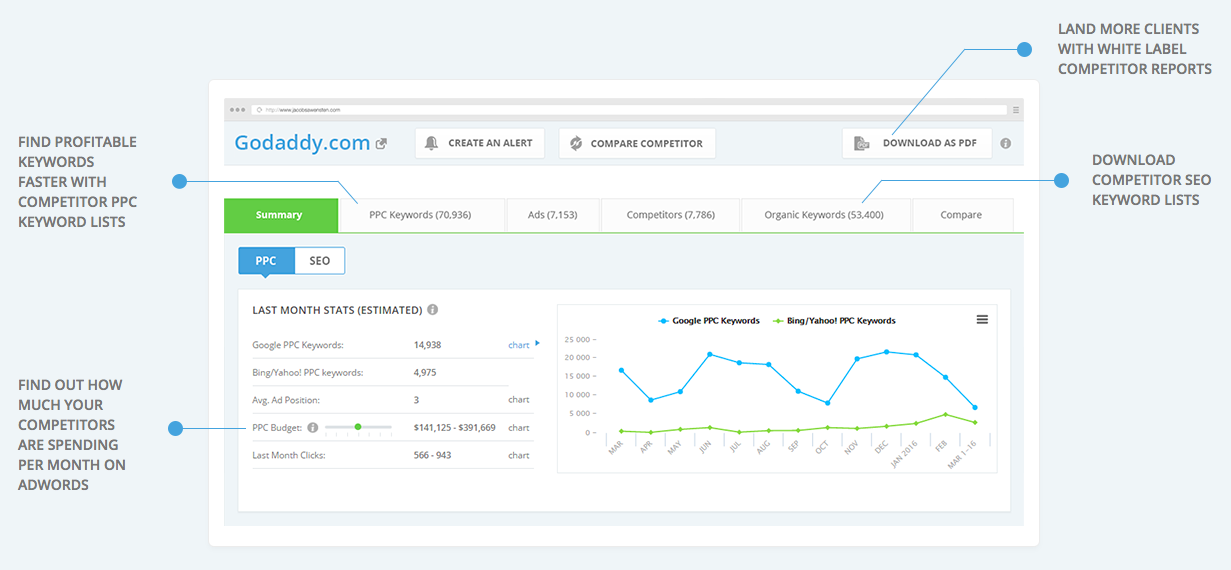
PPC Keywords
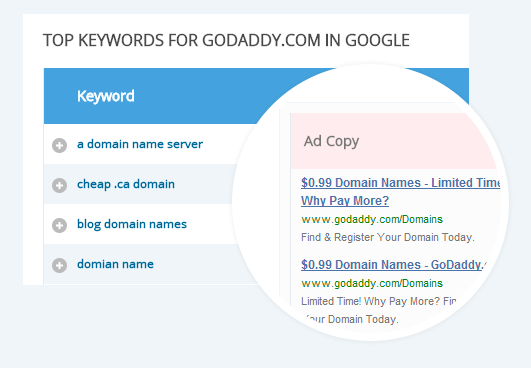
Although iSpionage is great at revealing info about the organic keywords your competitors are using, it also shares their PPC keywords. That can be valuable insight if you find that your competitors are reeling in visitors with keywords that you hadn’t thought to use. The PPC Keywords report lists the top search terms that your competitors are using in their ads. They’re listed in a table, in descending order of Keyword Effectiveness Index (KEI). The KEI is calculated based on two factors: the length of time that the competitor has used the keyword and the date that the keyword was last seen. Why does the length of time that a competitor has used a keyword matter? Because if the competitor has run an ad with the same keyword for a very long time, there’s a very good chance that the keyword is bringing in targeted traffic. So you might want to use that keyword yourself if you’re not already doing so. In addition to the KEI, iSpionage also shows you the following data about each of your competitor’s PPC keywords:- Number of ads
- Cost per click (CPC)
- Average search volume
- Average position
- First seen date
- Last seen date
iSpionage Review: Ads
How would you like to see the ads that your competitors are running? After all, you might get some ideas for good copy that you can include in your own marketing efforts. Fortunately, iSpionage has you covered. In the Ads report, the tool will show you the headline, URL, and description for your competitor’s top ads. They’re displayed in a table in descending order of Ad Effectiveness Index (AEI). The AEI is the same thing as the KEI except for ad copy. In other words, ad copy that’s been running a long time will have a higher score than ad copy that’s been running a short time. The table also shows you the keywords that triggered the ad. But because there could be several keywords, you’ll have to click an element to open a popup window and view them. Once again, the keywords are displayed in a table. Additionally, the Ads report table shows the following info:- Monthly traffic
- Average rank
- Days seen
- First seen date
- Last seen date
iSpionage Review: Organic Keywords
The Organic Keywords report shows you which keywords are bringing traffic to your website from the SERPs. Again, the data is displayed in a table. It’s ranked in descending order of the number of keywords that the page ranks for in the Google top 10 search results. For example, if you have a page that ranks for 178 keywords in the top 10, then that page will appear above any pages that rank for fewer keywords in the top 10. Unlike some other tools, iSpionage shows you an image of the ranking page. It also displays the page title, URL, and description. Additionally, the table also shows the average position of keywords that rank for the page, the position trend as a line graph, the overall estimated traffic, and the traffic value in dollars. Even better, though, the tool displays a table within a table that shows you the top five keywords bringing people to that page. If you’d like to view more than five keywords, just click the big orange VIEW MORE button at the bottom of the table. If, for whatever reason, you don’t want to see the top keywords for a page, you can just click OFF next to “Keyword Grouping” at the top of the table. As is usually the case, the table is tabbed. One tab shows Google results, the other shows Bing/Yahoo results.Competitors
The iSpionage tool also identifies your top competitors. In fact, it shows your top competitors in two ways: based on PPC keywords and based on organic keywords. The default report shows you PPC competitors. It’s in a table that lists each competitor as well as that competitor’s monthly budget, unique keywords, overlapping keywords, total keywords, number of ad copies, and average position. If you want to view the SEO report, click the SEO tab at the top of the table. A new table will appear showing the domain name of each competitor as well as that competitor’s SEO traffic value, overlapping keywords, and keyword count. Once again, there are two tabs at the very top of the table that allow you to switch between Google results and Bing/Yahoo results.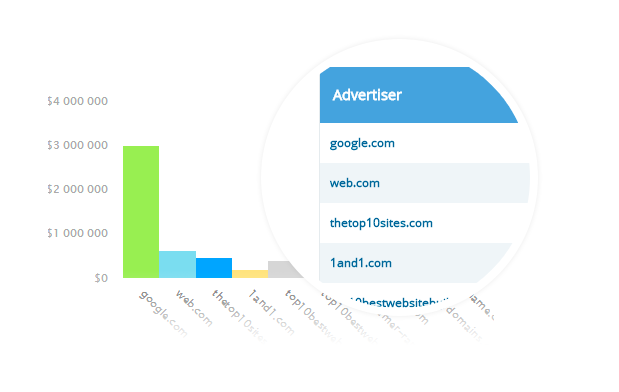
iSpionage Review: Compare Competitors
Maybe you’d like to compare some of your competitors with each other or compare your own website with a couple of your competitors’ sites. Fortunately, iSpionage enables you to do that. In the Compare report, enter as many as three URLs. Use the domain names of your competitors. Include your own domain name if you’re inclined to do so. Once you’re done, click the SEARCH button. At the top of the report you’ll see a line graph that highlights the average PPC budget of each site for the past year. For convenience, the lines that represent different sites are color-coded. That’s the default chart. There are three other charts you can view in that same section:- Average potential clicks
- Average position
- Number of Google Keywords
iSpionage Review: Campaign Watch
Marketing automation is an important part of a successful business strategy. That’s why the iSpionage Campaign Watch feature is so valuable. Here’s how it works: you set up a Campaign Watch for a competitor. Then, iSpionage will monitor that competitor for changes in digital strategy. Every week, the tool will send a report to your inbox that highlights its findings. In other words, you get to focus on the mission of your business while iSpionage spies on your competitors and lets you know what it finds. It’s like having a virtual assistant.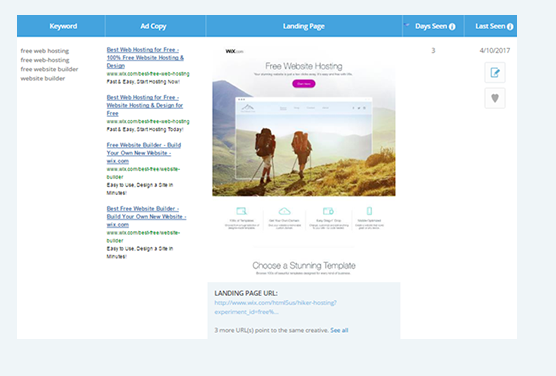
- SEM Performance – Compare your SEM performance against what your competitor is doing. Check out your market share, keyword rankings, and other important analytics.
- Full Funnel Campaign Details – Learn about your competitor’s keyword strategies, landing pages, and PPC ads. Feel free to imitate what’s working.
- A/B Test Results – Monitor your competitor’s split-testing results and see which ads are the ones that bring in the targeted traffic.
- Landing Pages – Use your competitor’s landing page as a template for your own marketing efforts. Monitor a competitor’s landing page for changes.
- SERP Snapshots – See how your PPC ads appeared on Google for each day of the month.
- You’ll never miss an update – You won’t have to worry if you skipped a few days of spying on one or more competitors. The automated agent won’t miss any days.
- You’ll see the whole sales funnel – iSpionage will track the entire sales process from acquisition to eventual conversion. You’ll learn about your competitor’s strongest strategies so you can incorporate them into your own campaigns.
- You’ll get free split-testing – How would you like to let your competitors pay for your split-testing? iSpionage shares competitor A/B test results.
- You’ll learn how to convert visitors – iSpionage offers actionable insights to help you optimize ad copy, call to action buttons, and landing page text.
Pricing
Pricing for iSpionage starts at $59 per month for a Starter account. The price goes all the way up to $299 per month if you’re looking for an Advanced account that offers much more data. If you need an Enterprise solution, you’ll have to call the company. It will be expensive, though. For any plan, you can save 16-50% if you choose to go bi-annual. That means you’ll pay for six months up-front.iSpionage Review: Pros and Cons
Plenty of people are already using iSpionage. Here are some of the positive and negative things they have to say about the tool. First, the positive:- Identifies mainstream and long tail keywords
- Easy to find what competitors are doing for search engine ads
- Outstanding keyword suggestions
- Enables users to create keyword alerts
- Landing page data is outstanding
- Needs better team collaboration features
- Sometimes missing data and missing competitors
- Not all of the data makes sense at first
- No social competitive data
- No tracking of display ads
- Free account is very limited