Jan 30, 2019 · 12 min read
Complete Ahrefs Review – Should You Use It?
Looking for a single tool that will help you keep tabs on your competitors, boost your search rank, and monitor your niche?
If so, then check out Ahrefs.
In this article, I’ll cover all the Ahrefs features. Then, I’ll share some insights from current users.
 It’s almost impossible to overstate the influence of Ahrefs within the digital marketing community. For many SEO professionals, it’s the tool that they simply can’t live without.
Why? Because it’s not just a single tool. It’s a suite of invaluable services.
Simply put: if you’re struggling with deciding on which tools to include in your digital marketing toolbox, you really can’t go wrong with Ahrefs.
Yes, it’s that good.
It’s almost impossible to overstate the influence of Ahrefs within the digital marketing community. For many SEO professionals, it’s the tool that they simply can’t live without.
Why? Because it’s not just a single tool. It’s a suite of invaluable services.
Simply put: if you’re struggling with deciding on which tools to include in your digital marketing toolbox, you really can’t go wrong with Ahrefs.
Yes, it’s that good.
Site Explorer
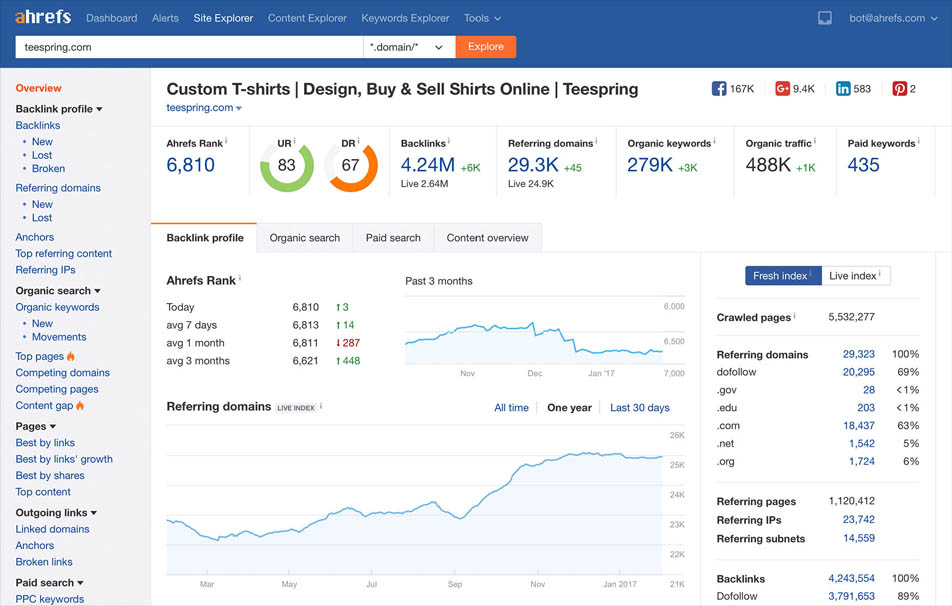
Would you like to learn more about competitor websites so you can imitate their strategies to rank your own site? If so, then you’ll love Site Explorer. Site Explorer looks and acts in many ways like SEMRush. So if you’re already familiar with that tool, you’ll have a short learning curve. Here’s what Site Explorer offers:- Organic traffic analytics – Learn about the keywords that competitors are ranking for. See which search terms are bringing home the bacon.
- Backlink checker – Where do your competitors get the backlinks that help them rank? Site Explorer will answer that question.
- Paid traffic analytics – Maybe your competitors are reeling in customers with paid ads on search results. If that’s the case, Site Explorer will show you the keywords they’re using, the ads they’re running, and their landing pages.
- Page analytics – Site Explorer will also show you which pages on a competitor’s website have the most social shares and backlinks.
Ahrefs Review: Keywords Explorer
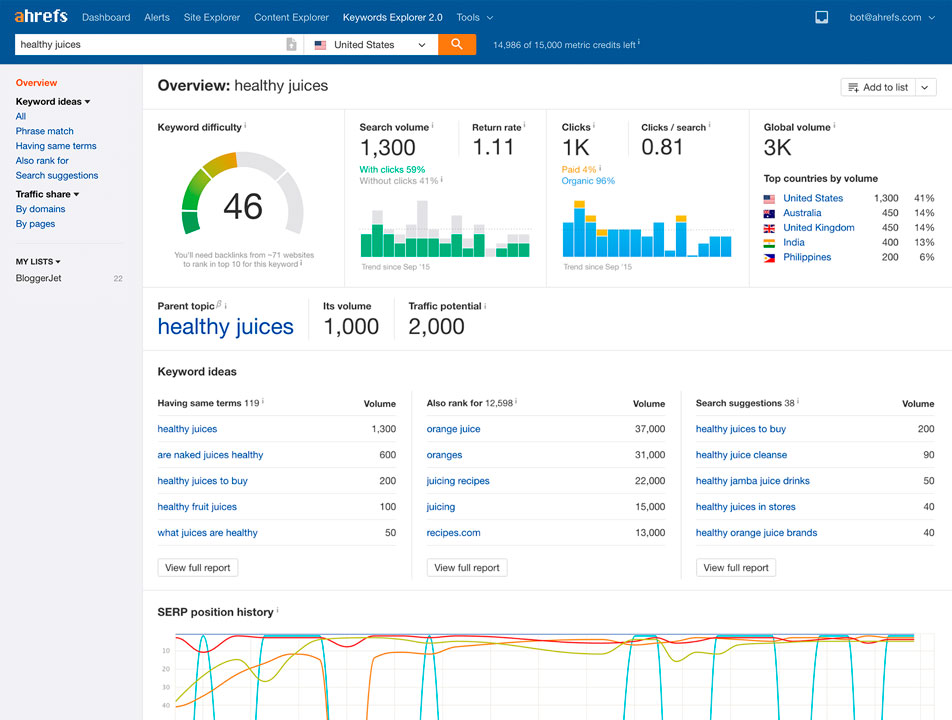
Ahrefs says that its keyword research tool is “the most complete keyword research tool on the market.” That might just be puffing, but there’s little doubt that you’ll find it a valuable source of inspiration when it comes to identifying keywords related to your niche. Here’s what you can expect from the Keyword Explorer tool:- Keyword suggestions – Get plenty of ideas on keywords that you can rank for. Uncover popular search terms that your competitors don’t even know about!
- Multinational support – Don’t think for a second that Keyword Explorer only offers English search terms. In fact, the tool supports more than 100 languages. In this global market, can you afford an English-only solution?
- Accurate volume metrics – Keyword Tool leans on clickstream data to give you accurate search volumes.
- Click metrics – You don’t just get volume metrics with Keyword Tool. You also get click metrics so you can see if people are actually clicking on the results they get. According to Ahrefs, no other tool offers that kind of detail.
- Advanced metrics – Learn about clicks per search, percent of paid clicks, return rate, and more.
- Keyword difficulty scores – Find keywords that are easy to rank with little to no competition. Go straight to the top with “low-hanging fruit.”
- Keyword lists – Aggregate your favorite keywords into a list that you can reference from time to time.
Content Explorer
Content Explorer shows you the content that’s hot for a particular keyword or topic. It’s like having BuzzSumo within another tool. Simply enter a keyword and Content Explorer will show you titles, excerpts, and links from around the web that are popular for that subject. How does Content Explorer determine popular content? It looks at the number of social shares and the backlink count. You’ll see that info in the report about popular content. For each article, Content Explorer shows you the number Facebook Shares, tweets, LinkedIn shares, and Pinterest pins. When it comes to backlink detail, the tool highlights the number of referring domains on the top-level report. You can drill deeper to see where the backlinks are coming from. Additionally, You can filter your search results by:- Social shares
- Domain rating
- Referring domains
- Traffic
- Word count
- Timeframe
Ahrefs Review: Rank Tracker
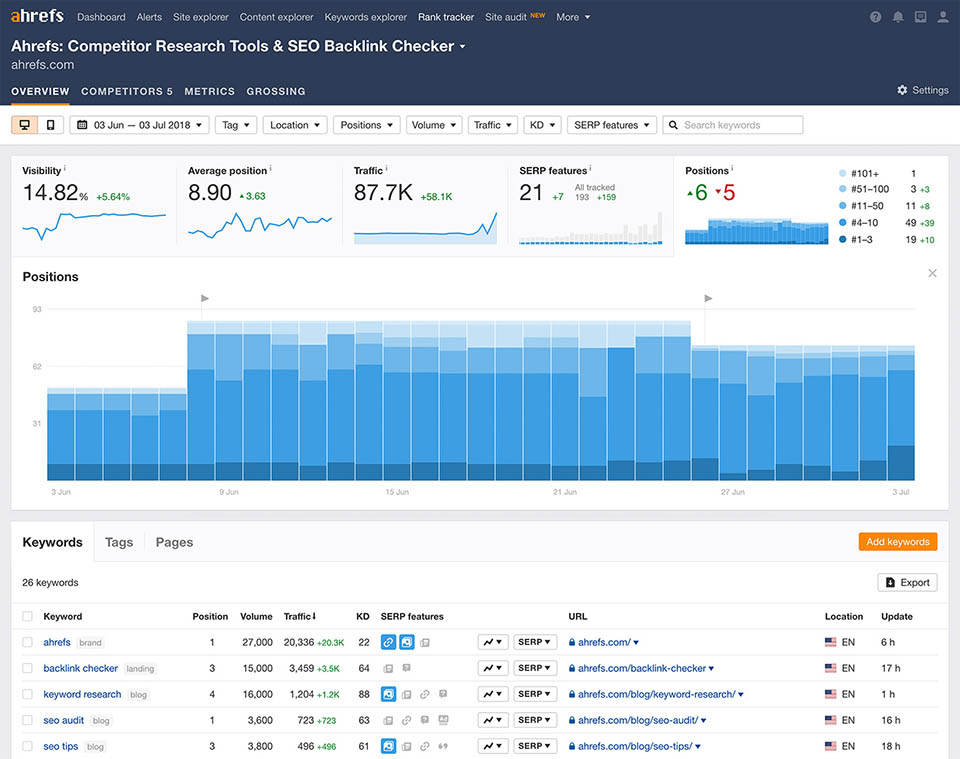
As an SEO professional, you want to know if your work is bearing any fruit. Ahrefs can help you answer that question with its Rank Tracker tool. For starters, it will show you the basic info: your rank for a particular keyword over time. It does quite a bit more than that, though. You can also compare your performance over time to a competitor’s performance. Rank Tracker will also show you ranking updates for both desktop and mobile platforms. Even better: it will show you results from 170 different countries. Rank Tracker interactive graphs highlight the following analytics:- Percentage of clicks from organic traffic that land on your site
- Average position and traffic
- Position distribution (Positions #1-#3, #4-#10, #11-#50, etc.)
Ahrefs Review: Site Audit
Would you like get an on-site SEO checkup? If so, then you’ll love the Ahrefs Site Audit tool. As with most other on-site tools, it uses a crawler to traverse all over your site. Then, it produces a helpful report with actionable insights. It’s not a problem if your website is huge, either. It might just take longer to crawl. However, you can filter out entire sections of your site with crawl settings. That will make crawling quite a bit faster. Site Audit will inform you about the following issues:- Performance – slow pages, large CSS files, and large HTML files
- Tags – missing or duplicate meta tags, title tags, and header tags
- Social tags – incomplete Open Graph tags or Twitter cards
- Content quality – duplicate pages, low word counts
- Localization – issues related to your use of hreflang
Alerts
With Ahrefs, reports come to you. The Alerts tool will notify you, via email, of new backlinks, lost backlinks, web mentions, and keyword rank changes. All you need to do is set up the appropriate alerts. Ahrefs will handle the rest.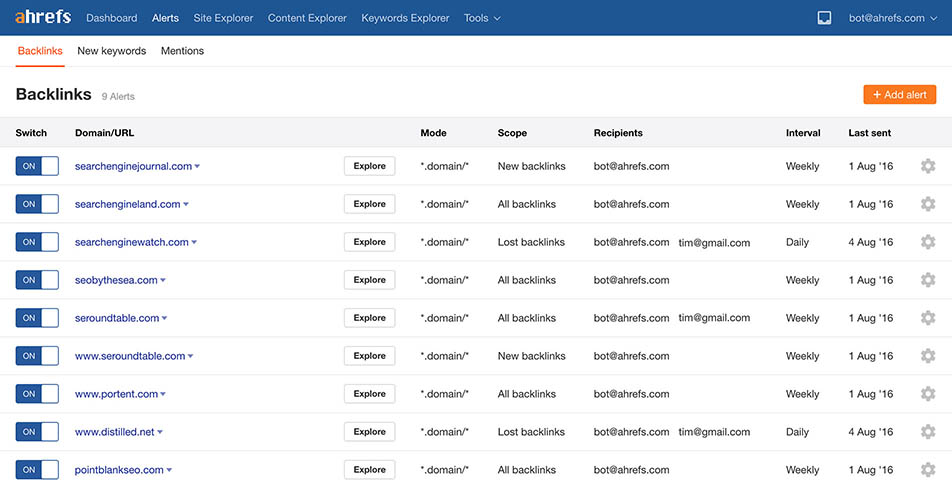
Ahrefs Review: SEO Toolbar
As if it weren’t easy enough to visit Ahrefs in the cloud and check vital web stats, the tool also offers a plugin so that you can take Ahrefs with you as you wander around cyberspace. The plugin exists for both Google Chrome and Firefox. Now, as you’re visiting a competitor website, you can see key metrics. You’ll gain insights such as:- Ahrefs Domain Rating (DR)
- Ahrefs URL Rating (UR)
- Ahrefs Rank (AR)
- Number of backlinks
- Number of referring domains
- Estimated search traffic
- Number of keyword rankings
Domain Comparison
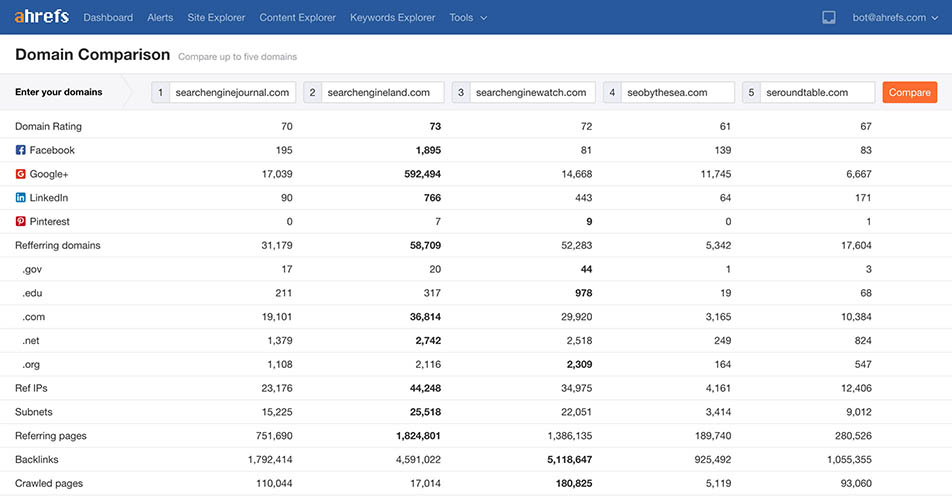
How would you like to see how one domain or website stacks up against another? Or two others? Or three others? In fact, the Ahrefs Domain Comparison tool lets you compare up to five domains at one time. Here’s the data that the tool shows you in its comparison report:- Number of backlinks
- Crawled pages
- Links from .gov sites
- Links from .edu sites
- Nofollow links
- Dofollow links
Ahrefs Review: Batch Analysis
Maybe you don’t want to evaluate websites one at a time. You’re busy, after all. Fortunately, Ahrefs has a batch analysis tool. It’s unsurprisingly named Batch Analysis. All you need to do is prepare a spreadsheet with up to 200 URLs. Then, import it into Ahrefs. The tool will show you a report that includes the following info for each URL:- Ahrefs Rank
- Domain Rating
- Number of referring domains
- Number of backlinks
- Social metrics
Link Intersect
Ahrefs also offers a Link Intersect tool that enables you to identify sites linking to your competitors but not to you. What can you do with that kind of information? You can reach out to the webmasters of those sites and ask for a backlink. Or you can pitch a guest-post idea to get a backlink. You can also use the tool to find a competitor’s “fans.” Those are websites that link to almost every new piece of content on the site. You might develop a few fans of your own thanks to Link Intersect.Ahrefs Review: Content Gap
Which keywords are your competitors ranking for but you aren’t? To answer that question, turn to the Ahrefs Content Gap tool. If you’re relying on an Excel spreadsheet to give you that info, you’ll need to know how to use some of the more advanced Excel features. That’s not the case with Content Gap. It’s a tool with an easy-to-understand user interface. It simply takes all the keywords that your competitor ranks for and subtracts from that set the keywords that your site ranks for. Everything else is what you should call “opportunity.” You can even use Content Gap to aggregate keywords that all your competitors rank for but you don’t. That should keep you busy for quite some time.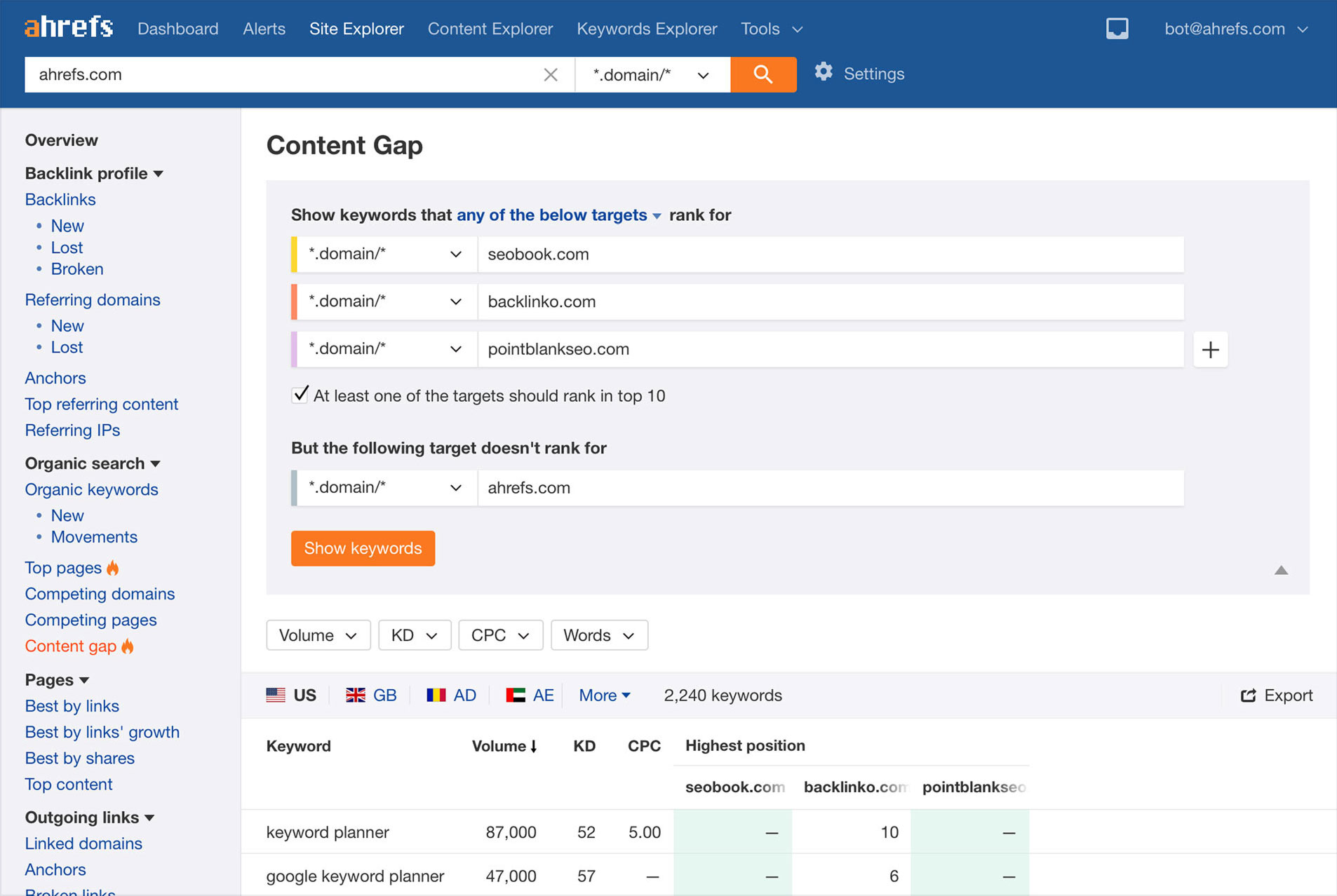
Backlink Checker
For any web page or domain, you can check its backlinks with the Backlink Checker tool. For each URL or domain, you’ll see two important metrics that I’ve touched on just briefly:- Domain Rating (DR) – The popularity of the domain.
- URL Rating (UR) – The popularity of the single page.
- A complete breakdown of a target’s backlink profile
- Estimated organic traffic to each linking page and referring domain
- Most linked-to pages
- A complete breakdown of all outbound links
- Backlink anchor text
Ahrefs Review: SERP Checker
SERP Checker analyzes search results, shows traffic potential, and helps you improve your rankings. For starters, you can use the tool to show real-time search results from different locations. That can be a big help if you’re working on international SEO. You’ll also see localized difficulty scores for keywords. Additionally, SERP Checker will show you the amount of organic traffic top results get from all the keywords they rank for. Finally, the tool also integrates with other Ahrefs tools. So you won’t have to worry about getting API access if you’d like to integrate the data with other features.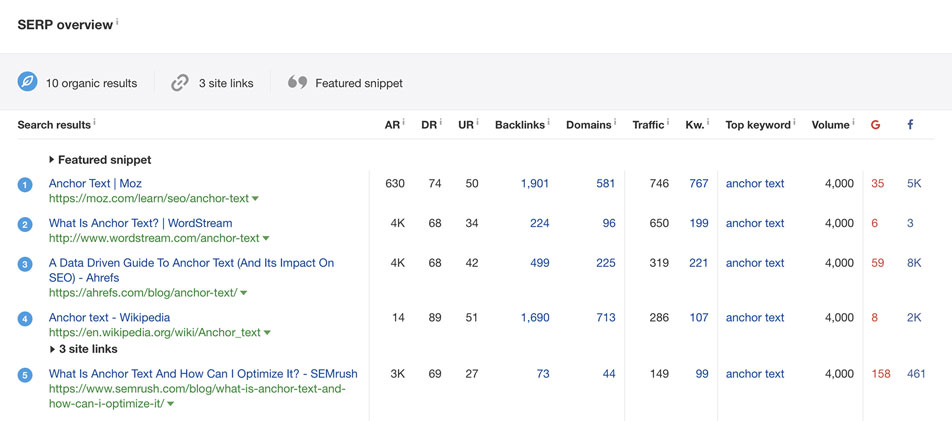
Pricing
There are four Ahrefs pricing plans:- Lite – $99/month
- Standard – $179/month
- Advanced – $399/month
- Agency – $999/month
- The number of keywords you’re allowed to track
- The number of campaigns you’re allowed to create
- The frequency of data updates
- The maximum number of pages the Site Audit tool will crawl
- The maximum number of domains and URLs you can research with Site Explorer every day
- The maximum number of backlinks per report or per month
- The maximum number of reports per day
- The maximum number of batch analysis keywords
- The maximum number of alerts
Ahrefs Review: What They’re Saying
Ahrefs has plenty of users already. Here’s what some of them are saying about it around cyberspace. First, the positive:- Highlights competitor info
- Dashboard gives a great bird’s-eye view of a website
- Tool has plenty of info, even for smaller sites
- Site auditor offers actionable insights
- It does almost everything
- Helps with content marketing strategy
- Best all-around SEO tool
- Keyword volume may be inaccurate sometimes
- Not always a lot of data on niche keywords
- Can be a bit confusing at times
- Tool requires a bit of a learning curve
- Smaller shops will find it expensive
- Need to upgrade to get the full feature set
- Site audit tool lags behind competitor tools
- Reports aren’t as pretty as they are with other tools